
This tutorial shows how to use a picture with a drawn route as a hidden camera-path instruction for image-to-video generation. The human guide is bilingual, but the actual generation prompt stays in English so the video model receives clearer camera, lens, motion, and cleanup instructions.يوضح هذا الدليل كيف تستخدم صورة عليها مسار مرسوم كتعليمات مخفية لمسار الكاميرا في توليد الفيديو من صورة. الشرح هنا ثنائي اللغة، لكن برومبت التوليد نفسه يبقى بالإنجليزية حتى يستقبل نموذج الفيديو تعليمات أوضح عن الكاميرا والعدسة والحركة وإزالة العلامات.
Why the prompt stays in Englishلماذا يبقى البرومبت بالإنجليزية
Many image-to-video systems follow technical English filmmaking terms more consistently than translated equivalents. Words like FPV, one continuous take, wide-angle lens, banking, roll, motion blur, no cuts, and remove annotations are common training and evaluation language. The guide can be translated for people, but the model-facing prompt should stay English for more reliable control.تتعامل كثير من أنظمة توليد الفيديو من الصور مع مصطلحات صناعة الفيديو التقنية بالإنجليزية بثبات أكبر من الترجمات. مصطلحات مثل FPV وone continuous take وwide-angle lens وbanking وroll وmotion blur وno cuts وremove annotations شائعة في لغة التدريب والتقييم. لذلك نترجم الشرح للإنسان، لكن نُبقي البرومبت الموجه للنموذج بالإنجليزية لزيادة وضوح التحكم.
- Translate the explanation for the user.ترجم الشرح للمستخدم.
- Keep the generation prompt in English.أبقِ برومبت التوليد بالإنجليزية.
- Describe the path with exact visual landmarks from the image.صف المسار باستخدام معالم مرئية دقيقة من الصورة.
- Repeat that drawn guide marks must disappear from the final video.كرر أن علامات التوجيه المرسومة يجب أن تختفي من الفيديو النهائي.
How the method worksكيف تعمل الطريقة
The picture gives the model the scene. The drawn path gives the model the camera route. The English prompt turns that route into movement rules and cleanup rules.الصورة تعطي النموذج المشهد. والمسار المرسوم يعطيه اتجاه الكاميرا. أما البرومبت الإنجليزي فيحوّل هذا المسار إلى قواعد حركة وقواعد تنظيف للنتيجة.
Use the reference image correctlyاستخدم الصورة المرجعية بالطريقة الصحيحة
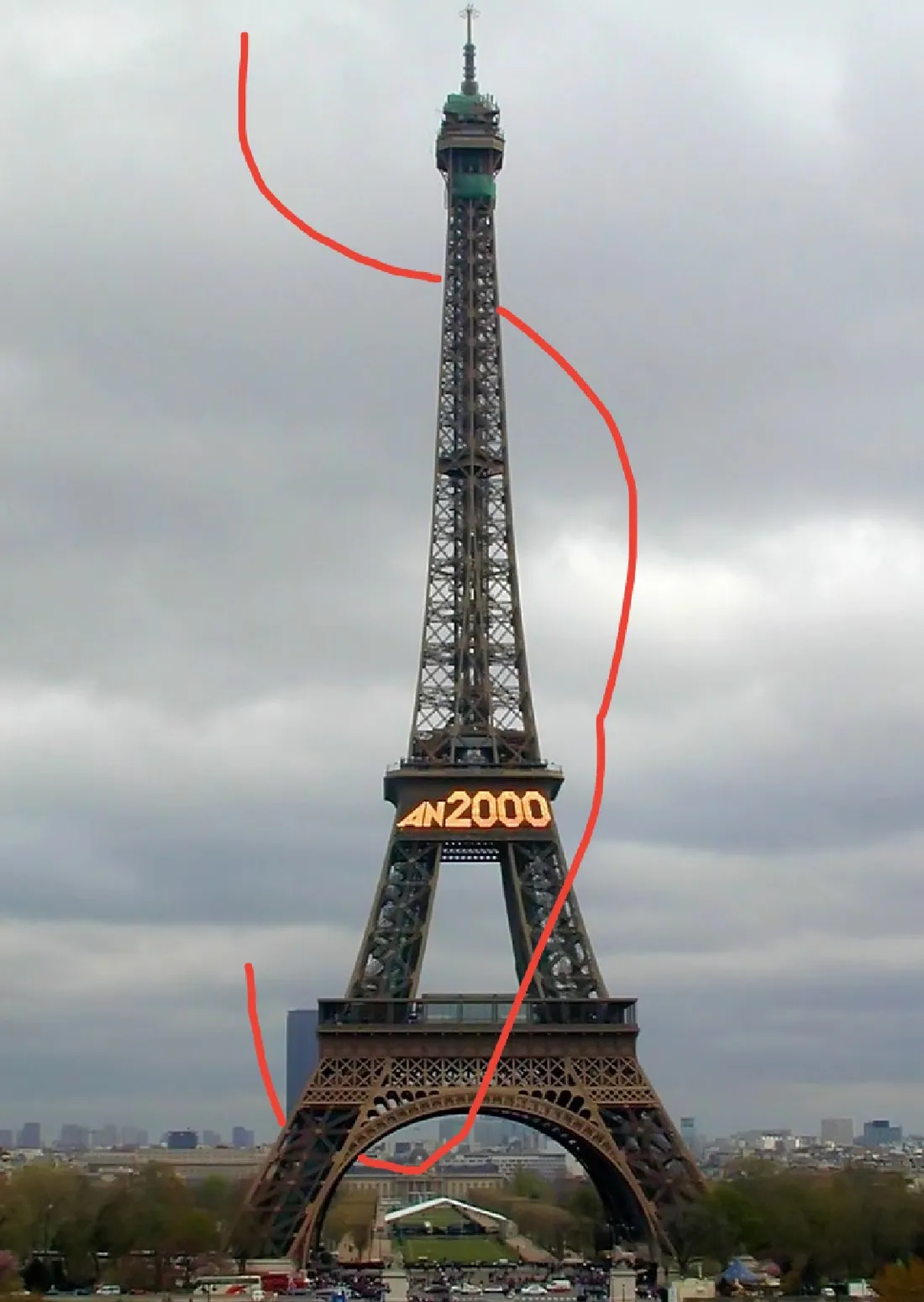
Treat the uploaded picture as a visual contract. The model should preserve the real subject, scale, lighting, weather, and camera perspective, while using the red line only as hidden route information.تعامل مع الصورة المرفوعة كمرجع بصري ملزم. يجب أن يحافظ النموذج على العنصر الحقيقي والحجم والإضاءة والطقس والمنظور، وأن يستخدم الخط الأحمر فقط كمعلومة مخفية لمسار الكاميرا.
Universal prompt template for any pictureقالب برومبت عام يصلح لأي صورة
Use this template when the subject changes. Replace the bracketed parts with the visible landmarks, start point, end point, and path shape from the new image. If the picture has no drawn route, describe the route in words.استخدم هذا القالب عندما يتغير الموضوع. استبدل الأجزاء بين الأقواس بمعالم الصورة الجديدة ونقطة البداية والنهاية وشكل المسار. إذا لم يكن في الصورة مسار مرسوم، فصف المسار بالكلمات.
Use the uploaded reference image as the exact visual reference for the subject, environment, scale, lighting, and composition.

If the image contains a drawn route, line, arrow, circle, label, or any other annotation, treat it as a hidden production guide only. It must not appear in the final video.

Create a realistic POV FPV drone shot in one continuous take, vertical 9:16, cinematic but natural. The drone must follow the marked or described camera path as strictly as possible.

Camera route:
- Start at [START POINT IN THE IMAGE].
- Move forward toward [FIRST LANDMARK OR OPENING].
- Pass through or near [KEY PASS-THROUGH POINT].
- Continue along [SIDE / CURVE / EDGE / PATH DIRECTION].
- Pass close to [IMPORTANT DETAIL OR LANDMARK].
- Climb, descend, or curve according to [THE EXACT ROUTE SHAPE].
- Finish near [END POINT IN THE IMAGE].

Motion rules:
- One continuous shot only.
- No cuts, teleporting, random orbiting, or route shortcuts.
- Keep the main subject visible and central unless the route naturally passes close to it.
- Use smooth FPV forward motion, realistic acceleration, slight banking or roll on curves, natural motion blur, wide-angle GoPro-style lens, authentic scale, and realistic depth.

Final-cleanup rules:
- Remove all annotations from the final video.
- Do not show guide lines, arrows, drawings, labels, UI marks, overlays, or prompt text.
- The reference marks are camera-path instructions only, not visual elements.

Scene quality:
- Preserve the reference image's real-world material, lighting, weather, architecture, and perspective.
- Make the result look like a real drone video captured in that place, not like a digital orbit or slideshow.
Eiffel Tower example promptمثال برومبت برج إيفل
This version is tuned to the uploaded Eiffel Tower reference and its red route. Paste it with the reference image in your image-to-video tool.هذه النسخة مضبوطة على صورة برج إيفل المرفوعة والمسار الأحمر فيها. استخدمها مع الصورة المرجعية داخل أداة توليد الفيديو من صورة.
Use the uploaded image as the exact visual reference for the Eiffel Tower, the overcast Paris sky, the tower scale, the central arch, the lattice structure, and the AN2000 sign.

The red drawn line is a temporary hidden FPV drone flight-path guide only. It must not appear in the final video.

Create a realistic POV FPV drone shot in one continuous take, vertical 9:16, cinematic but natural. The camera must follow the red path as strictly as possible.

Camera route:
- Start from the lower-left red line near the base of the Eiffel Tower.
- Move forward toward the central arch.
- Pass through or very near the central arch opening.
- Continue forward and climb upward along the curved red path on the right side of the tower.
- Pass close to the AN2000 sign while keeping the tower as the central subject.
- Continue upward beside the tower lattice, following the same right-side curve.
- Curve left around the upper section of the tower.
- Finish near the top-left end of the red path beside the tower peak.

Movement requirements:
- Match the red line's shape: no shortcuts, no random orbiting, no drifting away from the route, no teleporting, no sudden camera cuts, and no reversing direction.
- Move like a small FPV drone following a precise guided route.
- Use a wide-angle GoPro-style FPV lens, smooth forward motion, realistic acceleration, slight banking and roll on curves, realistic motion blur, authentic scale, and realistic depth.
- Keep the Eiffel Tower visually dominant throughout the shot.
- Preserve the overcast Paris atmosphere and natural daylight.

Final-cleanup requirements:
- Remove all annotations from the final video.
- Do not show the red line, drawings, arrows, UI marks, labels, or overlays.
- The red line is only a hidden camera-path instruction.
Checklist before generatingقائمة تحقق قبل التوليد
Before you generate, check that the prompt controls both movement and cleanup. Most failed attempts happen because the model follows the scene but ignores the route, or follows the line but leaves it visible.قبل التوليد، تأكد أن البرومبت يتحكم في الحركة والتنظيف معاً. معظم المحاولات الفاشلة تحدث عندما يتبع النموذج المشهد ويتجاهل المسار، أو يتبع الخط لكنه يتركه ظاهراً.
- The desired format is vertical 9:16.الصيغة المطلوبة رأسية 9:16.
- The movement is one continuous take with no cuts.الحركة لقطة واحدة متصلة بلا قطعات.
- The start point, end point, and route shape are explicit.نقطة البداية والنهاية وشكل المسار واضحة.
- The subject stays central unless the path naturally passes close to details.يبقى العنصر الرئيسي مركزياً ما لم يقترب المسار طبيعياً من تفاصيل معينة.
- The prompt says annotations, lines, arrows, labels, and overlays must not appear.ينص البرومبت على أن الخطوط والأسهم والتسميات والعلامات يجب ألا تظهر.